
Overview
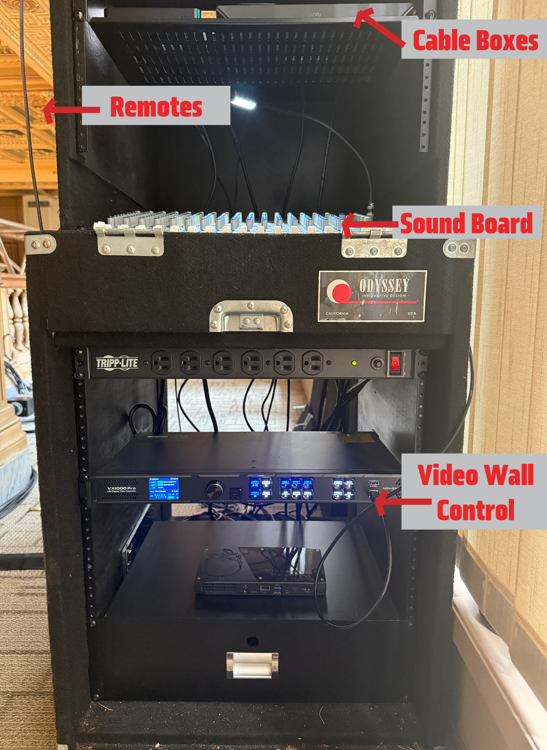
Control Cabinet
The video and sound equipment are located on the east end of the second floor in the control cabinet. The audio control, cable boxes, and video wall controller are all located in this case.
The direct route to the scend floor is the spiral staircase behind the teller windows to the left of the screen. On the second floor walk behind the screen to find the control cabinet.
Elevator access is available but requires a key card
Arrival
Settings
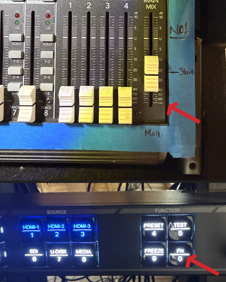
Step 1: Turn on video wall press bottom right button labeled FN 0
Step 2: Turn up sound: slide “Main Mix” control to the line marked “Start”. This can be adjusted throughout the event as needed.
Step 3: Identify channel of match (Fox or FS1) using the schedule listed here. Grab remote labeled “HDMI 1” located on top of cable boxes above the sound board, hold microphone button down and say “Fox” or “FS1”.
Departure
Slide volume fully down
Press FN — 0 to turn off screen
Tech Specifications:
Video Board Specs:
48 Panels
Screen Resolution 2016x1344
Pixel Pitch: 2.976
Video Wall Controller:
Novastar VX1000 Pro
ThinkPad Laptop running Control Novastar LCT
Video Sources:
HDMI 1: Comast Xfinity 4k Cable Box
HDMI 2: Comast Xfinity 1080p Cable Box (smaller box)
HDMI 3: Computer Connection